


Depending on the plan you're on, you could set up one or more Catalogs in your PPM account. Each of your PPM Catalogs gets unique links that create Booking Request Forms for that specific catalog.
First, however, it's important that you understand the different types and levels of information you can set about your packages in each of your PPM Catalogs.
Here’s a visual representation of how the different parts fit into each other, we’ll explain more below…
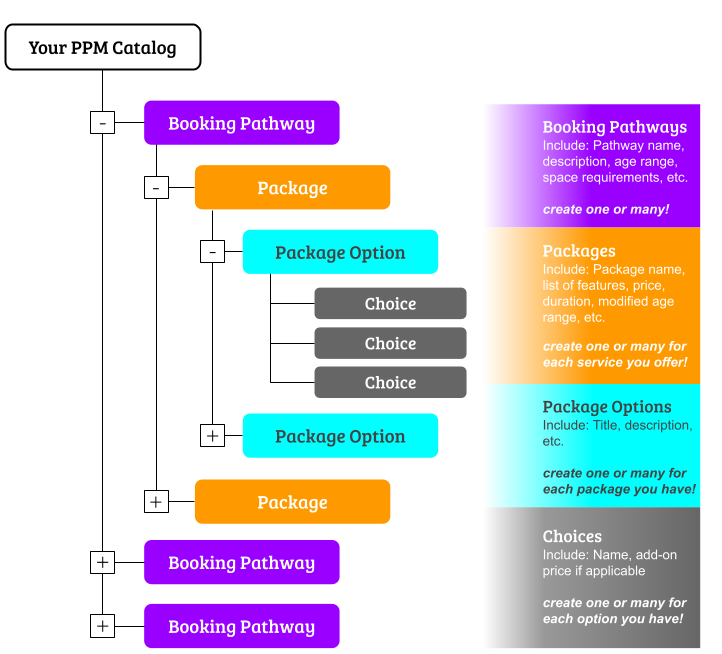
You can create multiple Booking Pathways within a particular catalog. You are only limited based on your subscription level.
They’ll look like this on your booking form:
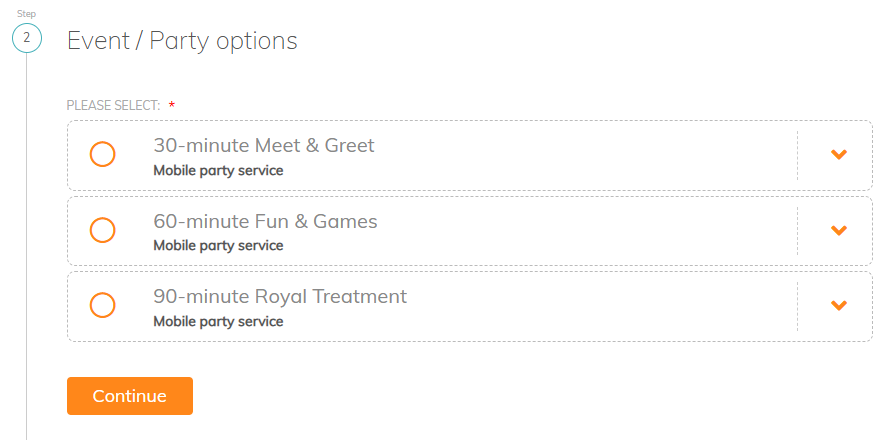
For each Booking Pathway, you can create as many Packages as you need.
These packages will only appear on your booking form after a pathway has been selected by your client, and they’ll look something like this:
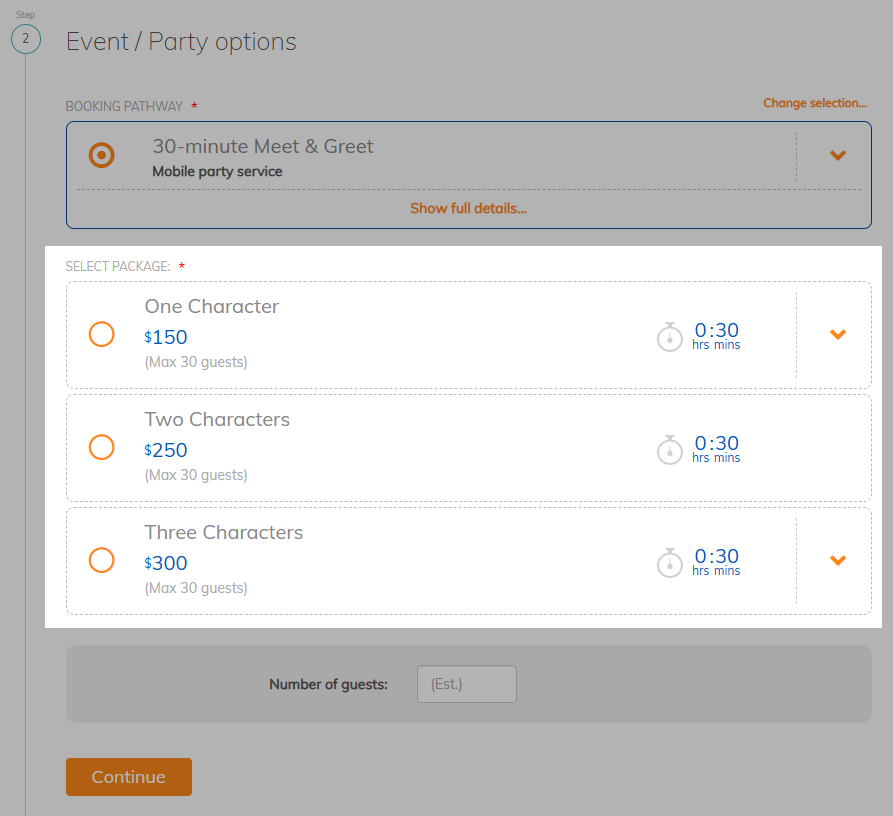
For each Package, you can create as many Package Options as you need.
Like the Packages, Package Options will only appear when they become relevant, which is after a Package is selected. They’ll look something like this:
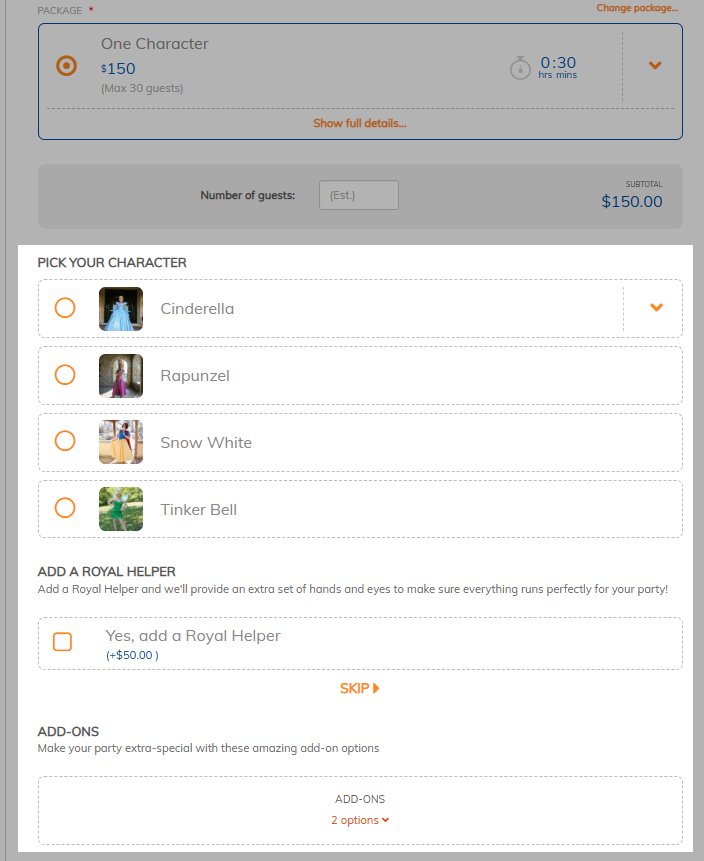
For each Package Option, you can create as many Choices as you need. As you can see, you have the ability to set your list of Choices to either be expanded by default (like the “Pick your character” option above) or to have the list collapsed (like the “Add-ons” option above) and let your client choose to expand if they’re interested.
After they’ve made their selections, the choices will look something like this:
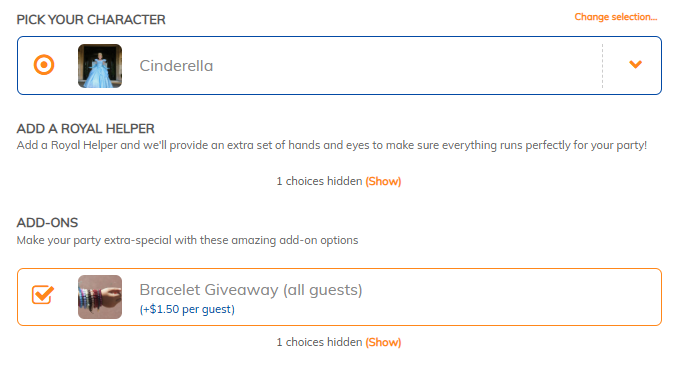
IMPORTANT NOTE: When you are setting up your “Choices” you can choose to link the choices to “Assets” you set up in PPM. The benefits to setting up and using Assets for your choices are:
- They are reusable
(So you don’t need to retype the name each time you offer this choice in one of your packages) - You can include a picture and a description
(Shared wherever you offer this choice across your packages) - You can run reports to identify events with specific assets selected (or not)
When you are setting up Choices that you feel are a one time option and won’t be used in many other Packages, it can be easier and quicker to skip setting up an Asset. Learn more about creating and using Assets here.
Catalog Structures
Your business is unique and we understand that! PPM’s Flexible Catalog Creator allow you to build your booking form based on your unique needs!
While the possibilities are endless, there are a few popular structures we see used most often. These are based on the 'key client decision' (a.k.a. the first decision the client needs to make).
These Key Client Decisions are:
- Duration
Client selects desired event duration → then picks package based on options like theme, number of staff/participants, event type, etc. - Activity / Service
Client selects desired activity or theme → then picks package based on options like duration, number of staff/participants, event type, etc - Event-Type
Client selects type of event → then picks package based on options like duration, theme, number of staff/participants, etc. - Number-of-Staff
Client selects desired number of staff/entertainers you’ll provide first → then picks package based on options like theme, duration, number of participants, event type, etc. - Group Size
Client selects expected group size → then picks package based on options like theme, duration, number of staff, event type, etc. - Location
Client selects their preferred location → then picks package based on options like theme, duration, number of staff, event type, etc.
☝️ Don’t overthink this at the start: If you’re unsure which structure fits, pick a simple structure (or a template) and launch with one catalog. You can refine over time — including splitting into multiple catalogs later if needed.
☝️If clients can request more than one service in a single booking, see also: Handling Multi-Service Bookings
Here’s an example of how each of these might be set up in PPM...
Key Client Decision: Duration
→ imagine a company that offers different character entertainers, where picking the duration of the entertainment is the primary decision and picking the character preferences is the secondary decision
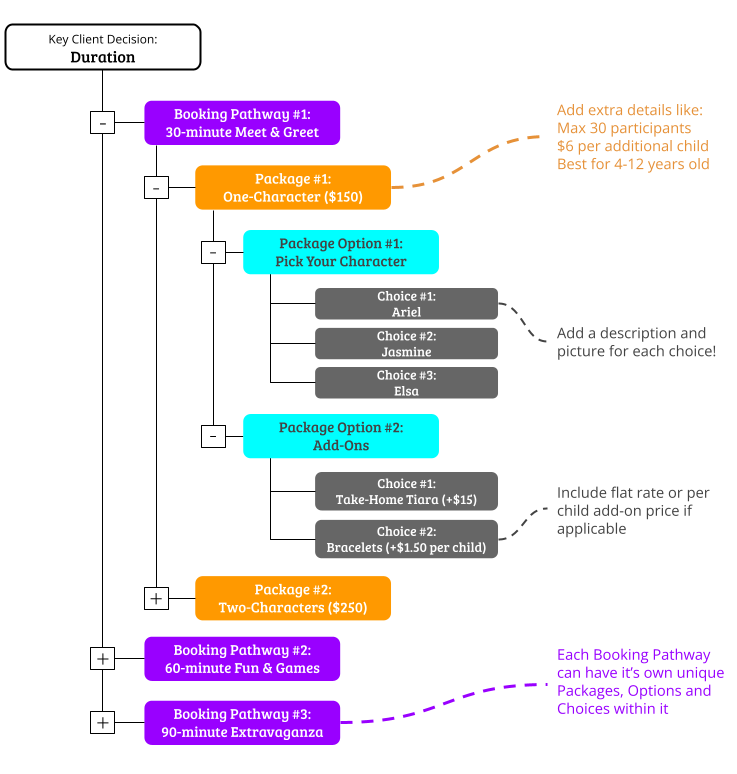
Note: while you may not be a character entertainer, simply replace the “characters” or package names with terminology more relevant to your particular business.
Key Client Decision: Activity / Service
→ imagine a company that offers different sports activities, where picking the activity theme is the primary decision and picking the duration is the secondary decision
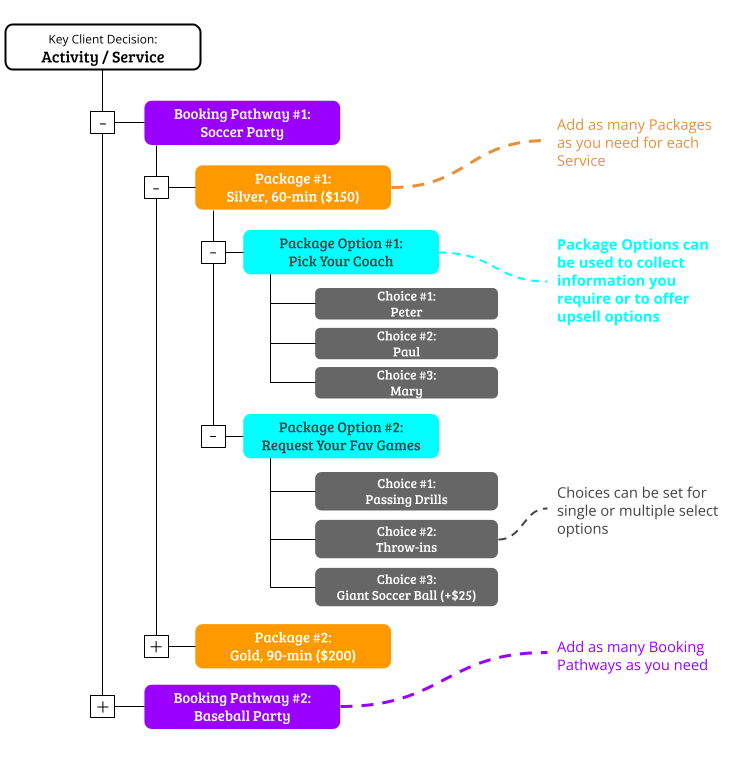
Note: while you may not be a sports-oriented entertainer, simply replace the “sports” with your characters, different performance types, different science themes, etc.
Key Client Decision: Event-Type
→ imagine a company that offers different types of Science events, where picking the event type is the primary decision and picking the activity is the secondary decision
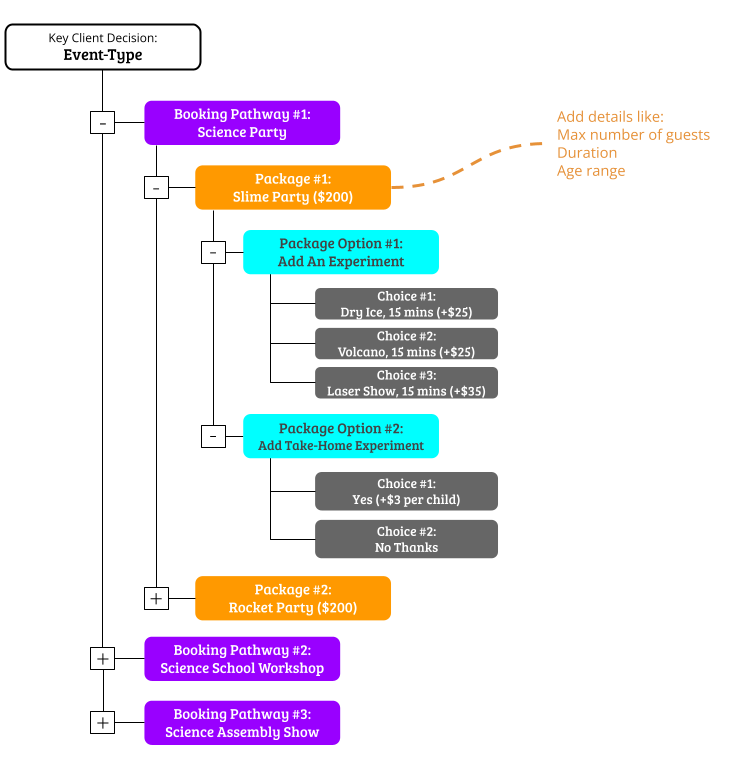
Note: while you may not be a science-based entertainer, simply replace the “science” aspects with your characters, sports, different performance types, etc.
Key Client Decision: Number-of-Staff
→ imagine a company that offers different performance entertainers, where picking the number of entertainers desired is the primary decision and the duration is the secondary decision and picking the entertainment type is the third decision to make
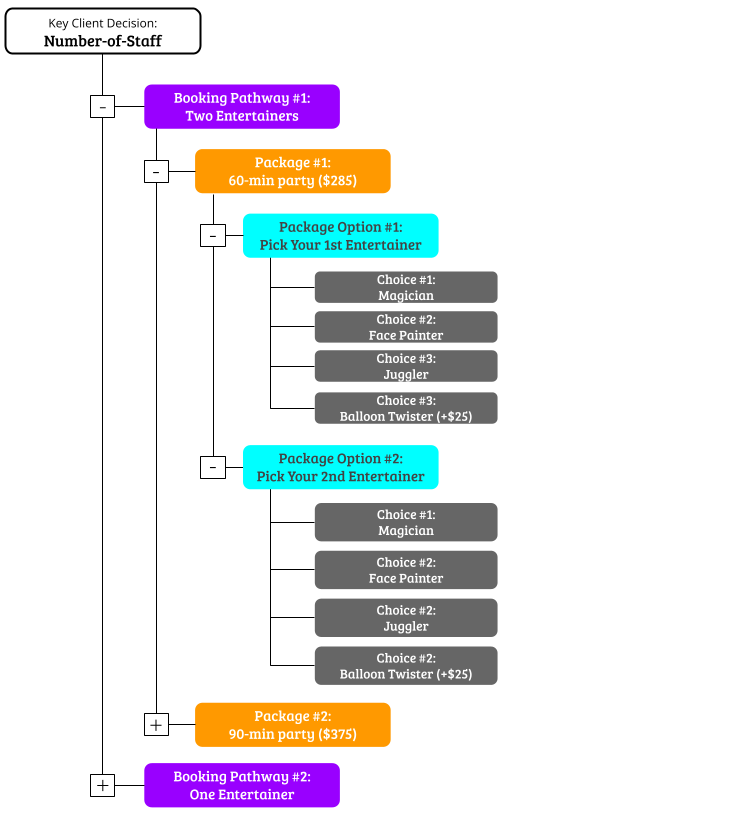
Note: while you may not be a performance entertainer, simply replace the different options with terminology more relevant to your particular business.
Key Client Decision: Group Size
→ imagine a company that offers bowling parties, where picking the group size / number of participants is the primary decision and choosing your add-ons is the secondary decision
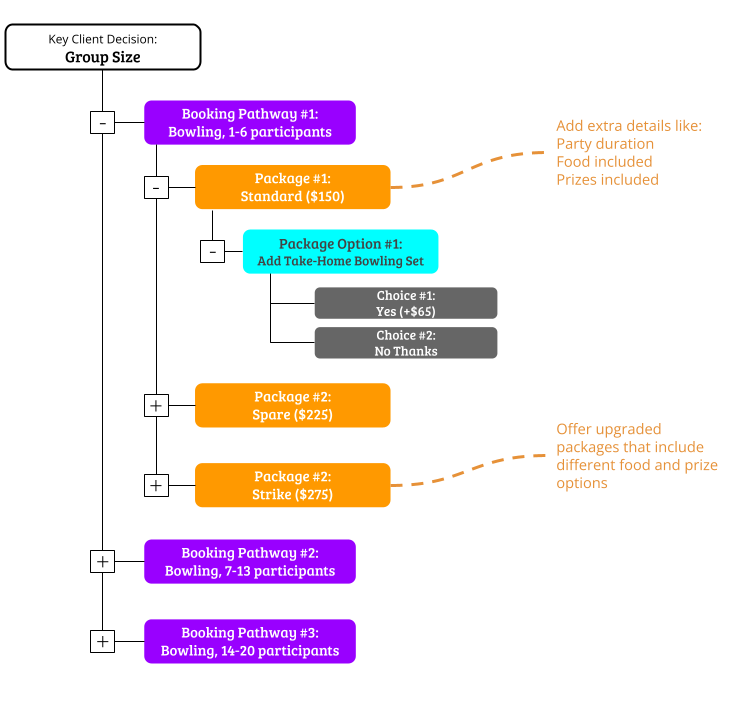
Note: while you may not be a bowling facility, simply replace the options with terminology more relevant to your particular business.
Key Client Decision: Location
→ imagine a company that offers art and crafting parties, where picking the preferred location is the primary decision and choosing your duration is the secondary decision
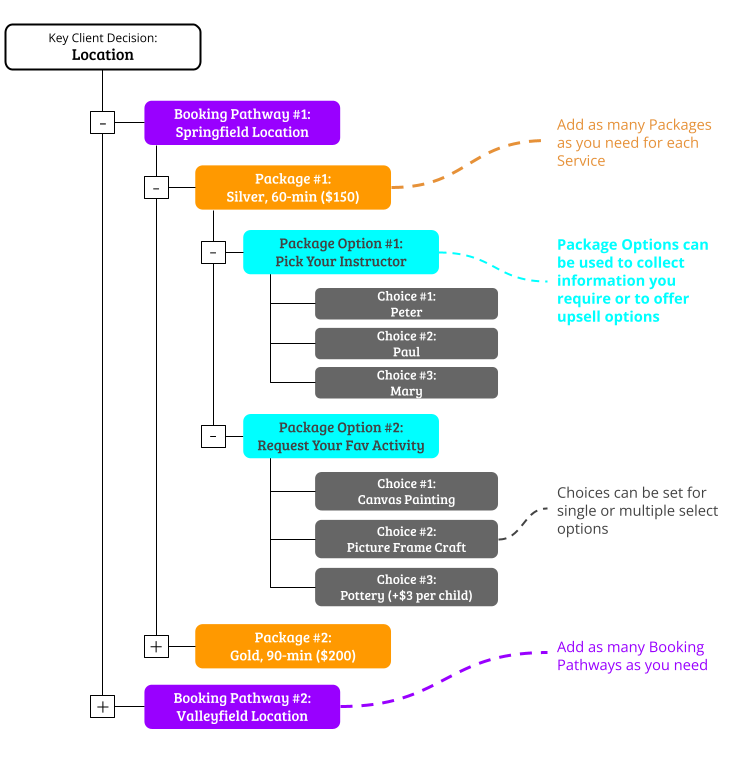
Note: while you may not be a art and crafting facility, simply replace the options with terminology more relevant to your particular business.
See also:
- Set up your catalog [VIDEO]
- Add or modify a catalog
- Get links to your Booking Request and Inquiry Forms
- Handling Multi-Service Bookings
recommended if clients can request multiple service types in one booking